Gidley's Gossipings

A blog about not much really

Why I didn't move to Fujifilm

2026-05-01 Photography Ben Gidley

I prefer shooting JPEG. I’ll do RAW when I need to — DXO PhotoLab does a good job — but most of the time I can’t be bothered. So colour straight out of camera matters to me, and that’s what started this whole detour.

I’ve been shooting on a Z5 with Picture Control 2 and it’s fine, but I’ve felt its limits. Meanwhile Fujifilm’s reputation for gorgeous straight-out-of-camera JPEGs kept coming up, and the influencer community around film simulation recipes was hard to ignore. Add in the metal body, the mechanical dials, the overall feel of the thing — I learned photography on a fully manual film SLR and Fujifilm clearly understands that shooting experience in a way most modern cameras don’t. I was tempted.

Continue reading

Growing Trend of Broadcast to OTT Delivery: Insights from iPlayer

2024-09-10 Tech Ben Gidley

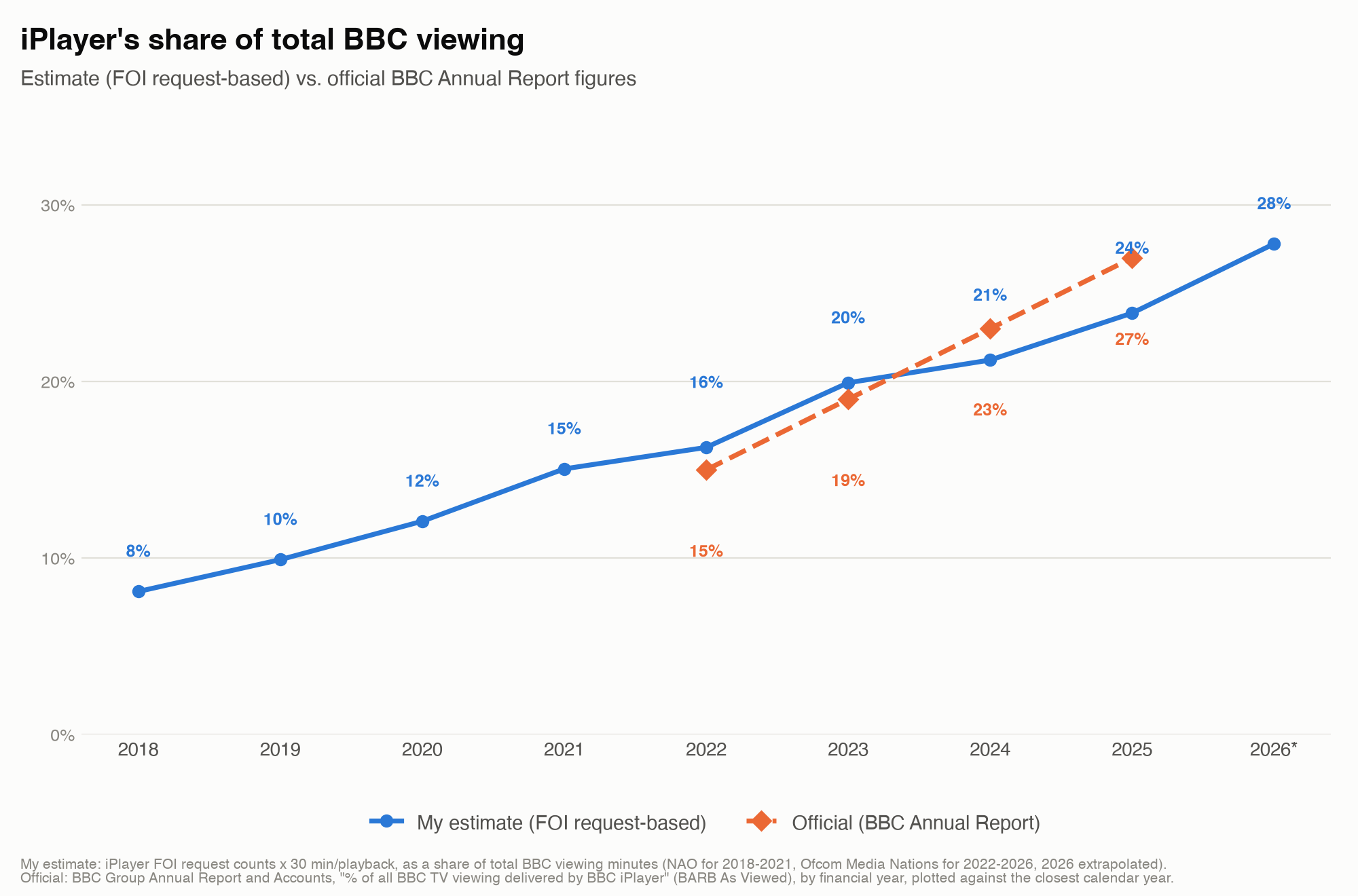
IBC is just around the corner, which means it’s time for my annual exercise in asking the BBC how the transition from broadcast to OTT delivery is going. This is something I’ve been doing since 2019 as I was curious to see how it progresses and given the BBC ‘unique’ model of funding it’s a good indicator of how consumers want services to behave ( once you take away paying for it). The data this year seems to show the trend continuing in a ‘linear’ fashion with usage growing year on year. This corresponds to OFCOM data which suggested that iPlayer was 14% of all viewing in Jan 2024, growing to 18% by mid year.

Continue reading

iPlayer Trends

2022-08-31 Tech

For several years I’ve been tracking the usage of iPlayer as I think it’s a great ‘bellwether’ for consumer behaviour in the TV industry. iPlayer is a unique proposition that has (nearly) ubiquitous device coverage, premium content consumers want to watch and is free (at point of usage). This lets consumers behave as they would naturally do, if you remove commercial pressure like bundling and content rights being split between services.

Continue reading

Google Cloud Migration Part3

2022-05-10 Tech

Continuing from Part 1 I had a change of heart…

I decided I really wanted my wild-card mail boxes (it’s a great way to manage spam) and I also noticed Cloudflare had launched their inbound mail relay service. The new plan is

  • Inbound mail goes to Cloudflare who redirect it to whoever it’s for gmail account
  • The gmail accounts are set up with an alias and a SMTP server (AWS SES) for gidley.co.uk to allow sending of emails from my domain
  • Wildcards are resolved by cloudflare and set to a suitable mailbox

Cloudflare Setup

The email features of Cloudflare are in beta, but they seem pretty easy to get onto. While I was on I moved many of my domains over to Cloudflare as their DNS registrar is cheaper than most.

Continue reading

Google Cloud Migration Part2

2022-01-22 Tech

Continuing from Part 1 the next task is to migrate email archives from Google Workspace email to the destination.

I decided to

  • Use iCloud as the new primary domain
  • Use Outlook.com as a backup for my old archive I split it like this as I have email going back a long time and frankly searching them is becomming a hassle.

Migrating a Mailbox

Migrating the mailbox is pretty straight forward - I decided to use imapsync running on a ‘free’ Google cloud instance. Using the cloud for this has the benefit of lots of bandwidth and being able to leave it running.

Continue reading

Google Cloud Migration

2022-01-20 Tech

I’ve been a user of Google Workspace for ‘gidley.co.uk’ email for me and my family pretty much since it launched. At launch it was ‘free’ for small users and over the decade I’ve been using it they have slowly moved it over to a paid service putting us ’legacy’ users on a special (still free) plan. Google have finally decided it’s time to stop us freeloaders… so it’s time to migrate. It’s been a great service, but I guess the free lunch has to end eventually.

Continue reading

Microsoft Teams Virtual Backgrounds

2020-04-14 Tech

I was excited to see Microsoft Teams have now enabled virtual backgrounds - but they’ve missed a key feature. How to set your own images.

A quick fix is upload files to

Library/Application Support/Microsoft/Teams/Backgrounds/Uploads

And presto you can use them in teams A new backdrop

Older posts